The Simulator
The Simulator evaluates the meta-model's aggregate predictions as simulated long/short perpetual-futures portfolios over historical Hyperliquid market data. It allows you to test portfolio construction rules, optimizers, rebalancing frequencies, and market frictions against the community signal.
You can use the Simulator interactively in your browser without writing code, or programmatically through the Python client, the crowdcent sim CLI, and MCP tools.
Run your first backtest in the browser
- Open the meta-model’s Simulation tab and stay on Strategy.
- Choose a Signal, the number of Longs and Shorts, a Rebalance cadence, and an Optimizer. Review fees and funding before running.
- Select Run, then read the performance chart together with its date range, drawdown, and costs. The chain-link icon beside Strategy Simulator copies a link to your configuration.
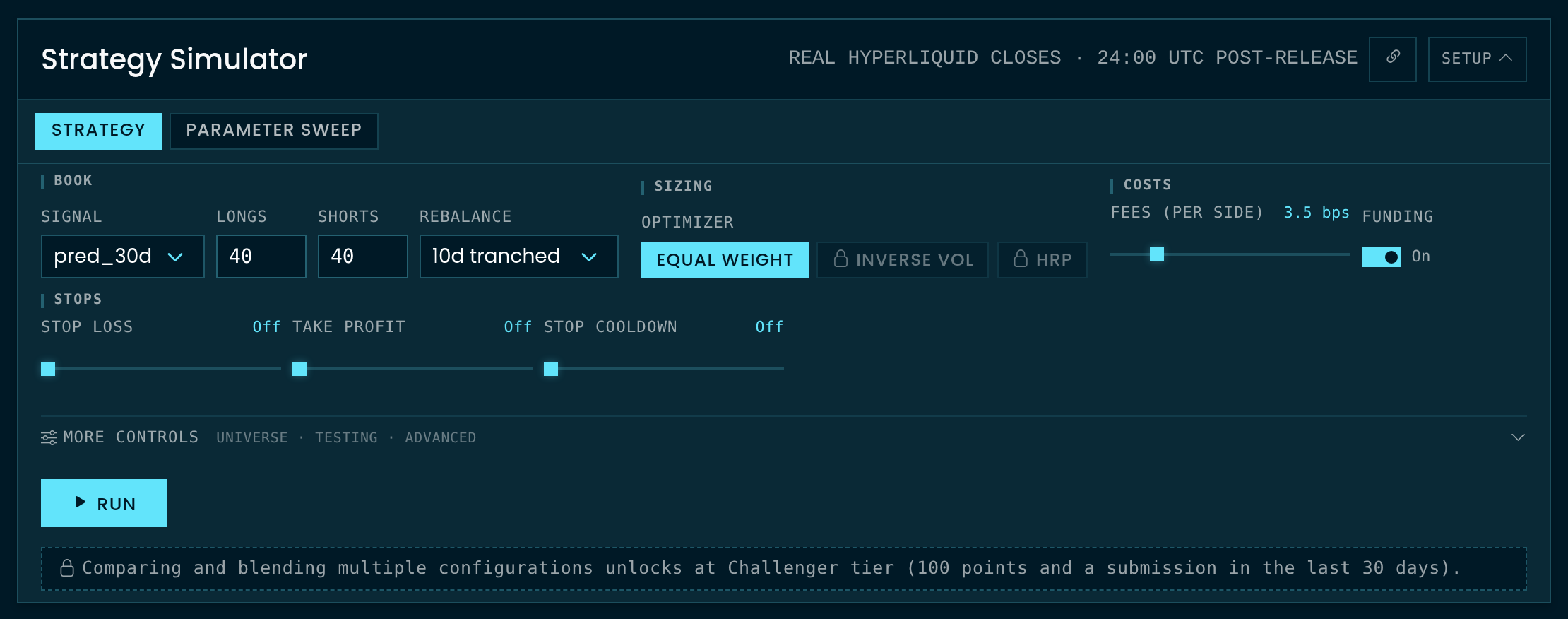
Portfolio construction knobs
The simulator supports several configuration parameters:
- Cohort sizing (
n_long,n_short): Number of top-ranked assets bought long and bottom-ranked assets sold short (1 to 100 names per leg). - Cadence and rolling tranches (
rebalance_days): Rebalancing intervals of1,5,10, or30days. Values ending int(5t,10t, or30t) use tranched rolling vintages. Tranched execution splits the portfolio into equal daily sub-cohorts to eliminate single-day rebalance timing luck. - Optimizers (
optimizer):equal(equal dollar allocation across assets),inv_vol(inverse 30-day volatility, Challenger tier), orhrp(Hierarchical Risk Parity, Challenger tier). Higher tiers unlock covariance optimizers and conviction-weighted sizing; the API's capabilities endpoint lists the optimizer keys and knobs your tier unlocks. - Frictions and carry costs (
include_funding,fee_bps,impact_book): Incorporates hourly perpetual funding rates (on by default), exchange transaction fees (0 to 20 bps per side, 3.5 by default), and order book market impact models for an assumed book size. - Sizing (
leverage,target_vol): One decision on the whole book, separate from its shape, so it is never a config knob:run_simulationandrun_blendtakeleverageandtarget_volbeside the config, and a config that names them is rejected.leverage(0.25 to 3.0, default 1.0) is the gross book as a multiple of equity. A vol target (target_vol, annualized, 0 = off) adapts the multiple to hold realized volatility near the target, never aboveleverage, so the two compose as a ceiling, not a product. The response echoes the pair assizing(clamped to natural below Contender, with the knobs named inlocked). Leverage is not free in the backtest: funding, fees and impact scale with gross, and a book whose gross drifts past the venue's maintenance margin (6x equity, the modal Hyperliquid perp) is liquidated, booked as a total loss and reported asliquidated_onin the stats. - Risk and liquidity filters: Optimizer risk window (
risk_lookback: 10 to 365 days of trailing returns, 0 = per-optimizer default), signal lag (signal_lag, 0 to 14 days), minimum open interest (min_oi), and minimum daily trading volume (min_volume). Continuous knobs snap to the step the capabilities listing reports.
Evaluation metrics and reports
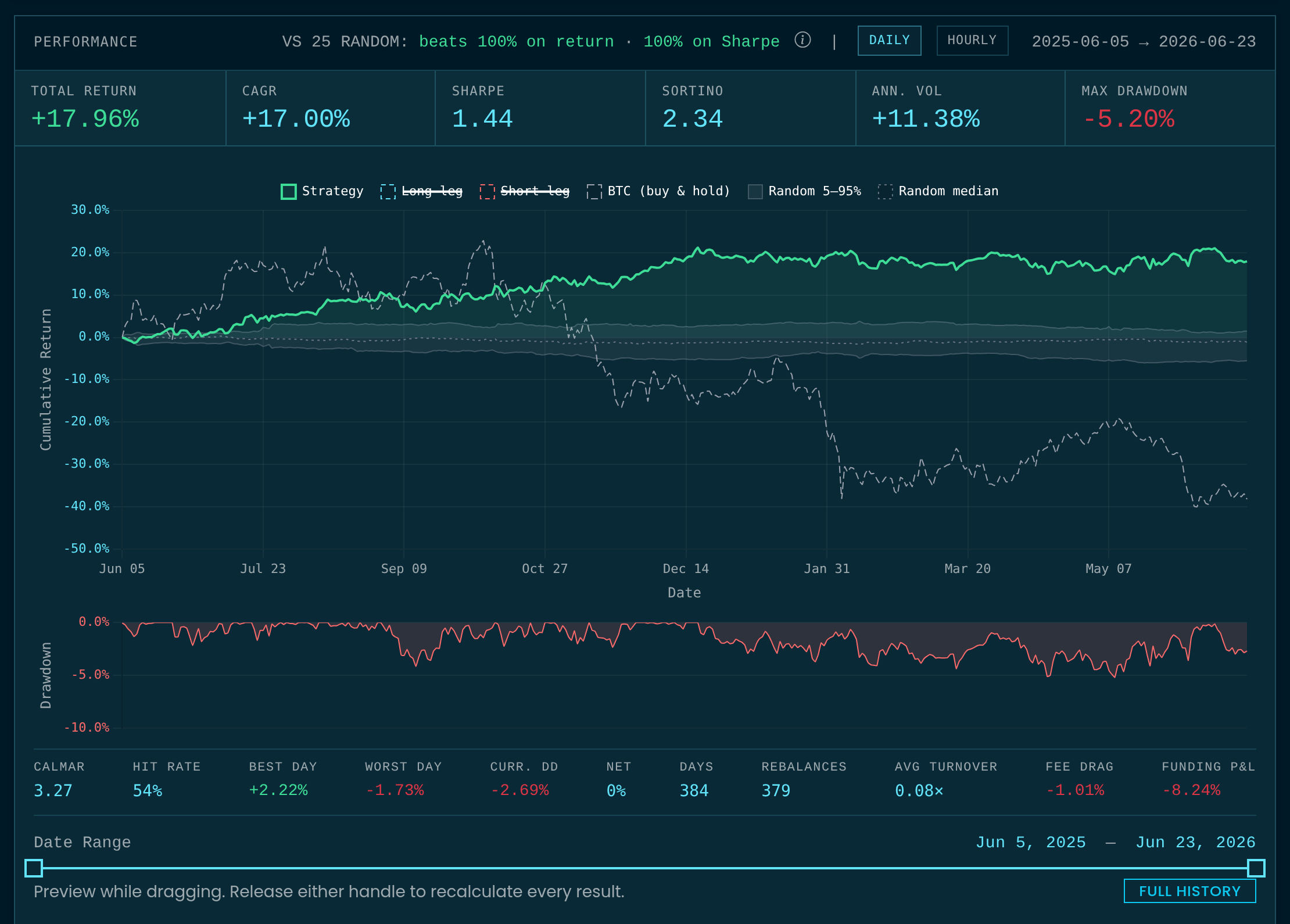
Every backtest produces performance metrics for the full period (stats), split in two: in-sample (is_stats), everything before the cut, and out-of-sample (oos_stats), the final oos_days of the result. oos_days is 90 by default, any length you choose, or 0 for no out-of-sample period (out-of-sample stats need 30 or more days). The response's split gives oos_days and oos_start, the first out-of-sample day. On the website the cut is the Out-of-sample control under the chart's date range.
- Core statistics: Annualized Sharpe ratio, Sortino ratio, CAGR, maximum drawdown, annualized volatility, and average gross. A path that reached zero equity (
ruined_on) or was liquidated (liquidated_on) reports total return and drawdown only; its annualized ratios are withheld. - Optional breakdown series (
include): Daily NAV curve (curve), current target weights (holdings), monthly returns table (monthly), and per-asset P&L attribution (contributions). - Null benchmarks (
benchmark_trials): Compares strategy performance against up to 100 random-ranking portfolios with identical construction rules to test whether returns exceed chance.
Parameter sweeps and multi-sleeve blends
- Parameter sweeps (
run_sweep): Evaluates a grid of configurations (e.g., testing multiple cohort sizes against different rebalance cadences). Pick candidates on in-sample numbers, prefer settings whose neighbors also perform, and read out-of-sample numbers only after you pick, since choosing on the out-of-sample period makes it in-sample. On the website the results are linked panels: equity curves, a scatter of any two measures (in-sample against out-of-sample Sharpe by default), one strip per swept setting, and a table of every config. Picks made in any panel show in all of them, and out-of-sample results can stay hidden until a config is picked. - Multi-sleeve blends (
run_blend): Nets several weighted simulation configurations into one book, marked as one account (offsetting positions cancel before they are charged), and returns an inter-sleeve correlation matrix. Sizing belongs to the blend, not its sleeves: sleeves run at natural gross, weights shape the blend, and the netted book is sized once by the call's ownleverageandtarget_vol(the web chart's Sizing row under the charted configurations is the same pair).
Tier unlocks and parameter clamping
Simulator capabilities scale with your CC Points tier:
| Tier | Simulator features |
|---|---|
| Everyone | Backtesting on 90-day delayed meta-model data |
| Challenger (100+ points) | Real-time meta-model data*, Inverse-Vol & HRP optimizers, parameter sweeps, blends of up to 5 sleeves |
| Contender (500+ points) | Covariance optimizers, leverage and volatility targeting, market impact scaling, expanded sweep (up to 96 cells), blends of up to 10 sleeves |
| Centurion (1,500+ points) | Conviction-weighted sizing and classified alpha controls, blends of up to 25 sleeves |
| Sovereign (5,000+ points) | Blends of up to 50 sleeves |
Blend caps apply to live trading mandates as well: a mandate carries as many sleeves as your tier can blend.
*Real-time meta-model data at any tier requires a submission in the last 30 days. Without one, data falls back to a 90-day delay.
If a configuration specifies a parameter above your current tier, the server automatically clamps the value to your highest accessible tier rather than failing the request. Clamped parameters are listed in the locked field of the response.
Quickstart
from crowdcent_challenge import ChallengeClient

client = ChallengeClient("hyperliquid-ranking")

# 1. Backtest a single configuration
result = client.run_simulation(
    config={
        "n_long": 10,
        "n_short": 10,
        "optimizer": "inv_vol",
        "rebalance_days": "10t",
        "include_funding": True,
    },
    include=["curve", "holdings"],
    benchmark_trials=25,
)

print(f"In-sample Sharpe: {result['is_stats']['sharpe']:.2f}")
print(f"Out-of-sample Sharpe: {result['oos_stats']['sharpe']:.2f}")
print(f"Web URL: {result['web_url']}")

# 2. Grid-search across multiple parameters, holding out the last 180 days
sweep = client.run_sweep(
    config={"n_short": 10, "optimizer": "inv_vol", "include_funding": True},
    sweep={"n_long": [5, 10, 20], "rebalance_days": ["5t", "10t", "30t"]},
    oos_days=180,
)

# Pick in-sample, then look out-of-sample
picks = sorted(sweep["results"], key=lambda c: c["is_stats"]["sharpe"])[-3:]
for cell in picks:
    print(cell["params"], "Out-of-sample Sharpe:", cell["oos_stats"]["sharpe"])

# 3. Blend weighted sleeves into an ensemble portfolio
blend = client.run_blend(
    sleeves=[
        {
            "config": {"n_long": 5, "n_short": 10, "rebalance_days": "30t"},
            "weight": 0.6,
            "label": "Slow Trend",
        },
        {
            "config": {"n_long": 10, "n_short": 10, "rebalance_days": "5t"},
            "weight": 0.4,
            "label": "Fast Rebalance",
        },
    ]
)

print("Composite Sharpe:", blend["stats"]["sharpe"])
print("Sleeve Correlations:", blend["correlation"])
# 0. The knobs and values your tier allows
crowdcent sim capabilities

# 1. Backtest a single configuration
crowdcent sim run \
  --config '{"n_long": 10, "n_short": 10, "optimizer": "inv_vol", "rebalance_days": "10t", "include_funding": true}' \
  --include curve --include holdings --benchmark-trials 25

# 2. Grid-search across multiple parameters
crowdcent sim sweep \
  --config '{"n_short": 10, "optimizer": "inv_vol", "include_funding": true}' \
  --sweep '{"n_long": [5, 10, 20], "rebalance_days": ["5t", "10t", "30t"]}'

# 3. Blend weighted sleeves into an ensemble portfolio (JSON from a file)
crowdcent sim blend --sleeves @sleeves.json
Deploying to live trading
Once a portfolio strategy has been evaluated in the Simulator, you can deploy it as a mandate on Hyperliquid using Live Trading (Challenger tier and above).
Simulator Disclaimer
Simulations are provided for informational and educational purposes only. Not financial, investment, or trading advice. Simulated performance is not indicative of future results. Perpetual futures are leveraged instruments and you can lose your entire margin. See the full disclaimer.